
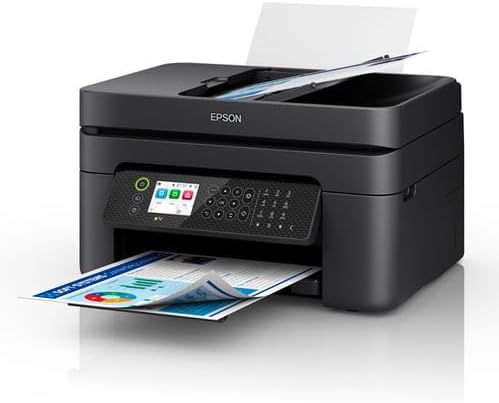

- 10 ppm Fast office printing
- Auto duplex Print both sides
- Wireless Wi-Fi
Epson
Workforce WF-2950 Multifunction Printer
- WF-2950
- 10 ppm
- Duplex
- Wi-Fi
- Inkjet
- 10 ppm Print Speed Fast office printing
- Auto 2-Sided Printing Print both sides
- Wireless & Ethernet printing with or without a network
- Inkjet Colour
- Colour Print output
- WF-2950 Model
About this item
Epson Workforce WF-2950 Multifunction Printer is sold by Aussify Life. Packed in Australia, GST included, 30 days to send it back unused in the original packaging.All-round 4-in1 printer - space-saving design with great performanceWi-Fi & Wi-Fi Direct - Wireless printing with or without a networkSave time and paper - Auto 2-sided printing, plus 30-page Auto Document Feeder for copying and scanning with ease4 individual ink cartridges - Save money by only replacing colour usedIncluded components: WF-2950 Printer, 4 x individual ink cartridges (B, C, M, Y), Setup guide, Power cordMax printspeed color: 5.8 pages per minuteBrand: Epson.
- All-round 4-in1 printer - space-saving design with great performance
- Wi-Fi & Wi-Fi Direct - Wireless printing with or without a network
- Save time and paper - Auto 2-sided printing, plus 30-page Auto Document Feeder for copying and scanning with ease
- 4 individual ink cartridges - Save money by only replacing colour used
- Included components: WF-2950 Printer, 4 x individual ink cartridges (B, C, M, Y), Setup guide, Power cord
- Max printspeed color: 5.8 pages per minute
Product specification
Detail
Value
Brand
Epson
Connectivity technology
Wi-Fi
Printing technology
Inkjet
Special feature
Auto-Duplex, Network-Ready
Colour
Black
Model name
WF-2950
Printer output
Colour
Maximum print speed (colour)
5.8 ppm
Max print speed monochrome
10.3
Controller type
Android
Packed in
Australia
Shipping
Free on Australian orders
Returns
30 days, unused, original box
Warranty
2 years on office appliances
Category
Printers & scanners
Customer reviews
4.0
6 reviews
Filter:
A
Angus M.
✓ Verified purchase
The software is optional; I used USB and ignored it
Text comes out sharp enough for client paperwork. Packed properly and on the doorstep in a few days.
Helpful
O
Oscar V.
✓ Verified purchase
If you need a printer that just sits there and works, this is it
Wi-Fi setup took a few minutes on a Windows laptop. Sits in the corner and we forget it until invoices need printing.
Helpful
H
Henry R.
✓ Verified purchase
Printed the first page from a USB stick when the laptop was elsewhere
Handles the mixed pile: forms, contracts, the odd envelope. A little bulky on a shallow desk.
Helpful
R
Riley A.
✓ Verified purchase
The WF-2950 is the one on the accounts desk now
Paper jams if you overload the tray — that was me. Came packed in Australia. Carton was fine.
Helpful
M
Minh Y.
The software is optional; I used USB and ignored it
Quiet enough to live in the same room as calls. Arrived to Inner West without a dent in the box.
Helpful
N
Nadia E.
✓ Verified purchase
We put the WF-2950 in the spare room that is pretending to be an office
Followed the panel prompts and it joined the network. Text comes out sharp enough for client paperwork.
Helpful
You may also like
-
 New
New -
 New
New -
 New
NewPrinters & scanners
Memoking Mini Sticker Printer, T02 Thermal Label Maker with 6 Rolls Paper
-
 New
New -
 New
New